For years, Google Search Console only worked if you owned a website. That changed on July 7, 2026. Google now lets you connect your Instagram, TikTok, X, and YouTube accounts directly to Search Console and see exactly which Google searches send people to your social content. If your business gets found through social media as much as through your website, this update hands you data you have never had access to before.
In this guide, the team at Seven Seas Web Design walks you through exactly how to connect social media to Google Search Console, what every new report shows, the real advantages for small businesses, and how this update changes the relationship between social media and SEO. We manage social media marketing for businesses across Chicago and Lake County, and we have already started using these reports for our clients. Here is everything you need to know.
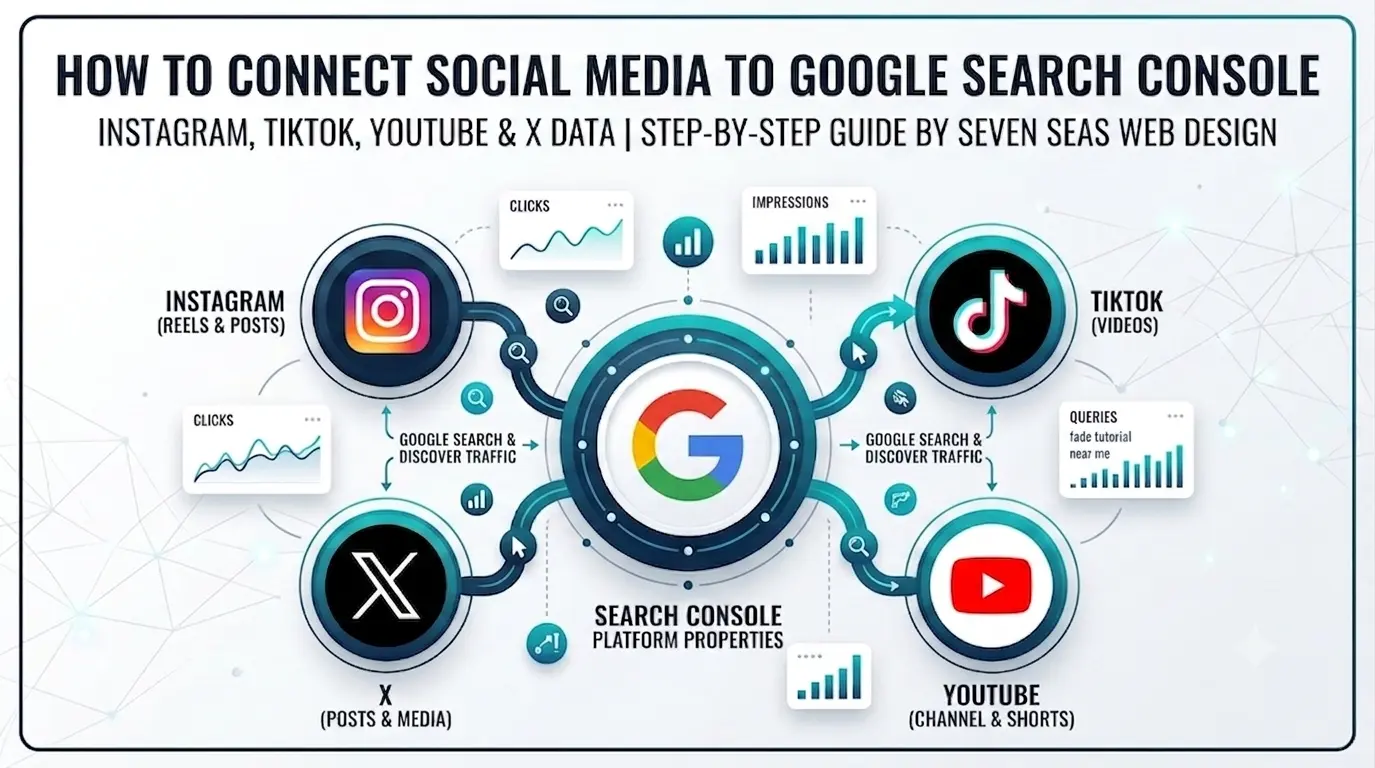
To connect social media to Google Search Console, open the property selector, click Add property, choose Instagram, TikTok, X, or YouTube, and sign in to that account to verify ownership. Google calls these platform properties. They show which Google searches send people to your posts, free, with no website required.
What Are Platform Properties in Google Search Console?
Platform properties are a new type of Google Search Console property, announced by Google on July 7, 2026, that let you verify a social media account instead of a website. Once connected, Search Console reports show how your posts on that platform perform in Google Search and Discover, including the exact queries people typed before clicking through to your content.
Platform properties let you verify a social account in Search Console and see the exact Google queries, clicks, and impressions your posts earn, with no website needed. Until now, Search Console answered one question: how does my website perform on Google? Platform properties extend that same reporting to your social accounts. You can now see that someone searched “barber shop fade tutorial” on Google and clicked through to your Instagram Reel, or that your YouTube video ranks for a question your website never answered.
This builds on an earlier experiment. In December 2025, Google introduced social channels in Search Console, which let site owners link social profiles to their existing website property. You can read Google’s official announcement on the Search Central blog for the full technical detail. Platform properties go much further. Your social account becomes a standalone property with its own Performance report, its own Insights, and its own milestone tracking, whether or not you have a website at all.
Does It Track Google Discover and Google News Too?
Yes. Platform properties report on Google Search, Google Discover, and Google News wherever your content appears on those surfaces. They do not track anything that happens inside the apps themselves. Followers, likes, shares, and in-app reach stay in each platform’s native analytics. Think of it this way: platform properties measure Google, your in-app analytics measure the platform.
Platform Properties vs Search Profiles: What Is the Difference?
Platform properties are private analytics that show how your posts perform in Google Search. Search profiles are shareable public profile pages. Google drew this line clearly in the announcement. Connecting a platform property changes nothing about how your account looks to the outside world. It only opens a reporting dashboard that you and the users you invite can see.
How to Connect Social Media to Google Search Console: Step by Step
The setup takes about five minutes per platform. You need admin access to the social account you are connecting and a Google account. Here is the exact process.
- Sign in to Google Search ConsoleGo to search.google.com/search-console and log in with your Google account. If you have never used Search Console before, you can start here with no website. That alone is new.
- Open the property selectorClick the property drop-down in the top left corner of any Search Console screen. This is the same menu you would normally use to switch between websites.
- Click “Add property”At the bottom of the property selector, choose Add property. You will now see the new platform options listed alongside the traditional Domain and URL prefix options.
- Select your platformChoose Instagram, TikTok, X, or YouTube. Each platform is added as its own separate property, so if you want reports for three accounts, you repeat this process three times.
- Authorize the connectionFollow the on-screen verification steps. Google securely connects to the platform and asks you to sign in to that social account to prove you own it. There is no HTML file upload, no DNS record, and no meta tag. Verification happens through the platform login itself.
- Wait for data to populateOnce verified, the property appears in your selector like any website property. Reports begin filling with data, and within days you can see queries, clicks, and impressions for your social content.
Platform Notes Worth Knowing
YouTube: if your channel is managed under the same Google account you use for Search Console, authorization is nearly instant. For brand channels with multiple managers, make sure you connect with an account that has owner-level access.
Instagram: you sign in with your Instagram credentials during the authorization step. Business and creator accounts work the same way. Connect the account itself, not a Facebook page.
TikTok and X: both use the same login-based authorization. If your accounts are managed by an agency, whoever holds the login completes the verification, then adds your Google account as a user on the property so you both see the data.
Rollout timing: Google stated that platform properties “will be gradually available over the next few weeks” following the July 7 announcement. If you do not see the platform options in your Add property menu yet, that is normal. Check back over the following days rather than assuming something is broken. Google also published an official help document about platform properties that covers edge cases such as account access and user permissions.
The Three New Reports and What Each One Shows
| Report | What It Shows | Why It Matters |
|---|---|---|
| Performance | Total clicks, impressions, and the exact search queries that led people from Google to your posts. Fully filterable and sortable, with export for spreadsheets and external tools. | This is keyword data for your social content. You finally see which posts Google surfaces and for which searches. |
| Insights | A high-level overview of recent traffic trends, your top performing posts, and how people discover your account on Google. | A quick health check you can read in two minutes. Ideal for owners who do not want to dig through raw query tables. |
| Achievements | Milestone tracking, such as passing a new total click threshold from Search within a 28-day period. | Gives you concrete progress markers to report on, which is especially useful for agencies proving value to clients. |
All three reports live inside the same Search Console interface you may already use for your website, and Performance data exports the same way, so it slots straight into existing reporting.
Is It Worth Connecting Your Social Media to Google Search Console?
Yes. If you actively post on Instagram, TikTok, X, or YouTube, you should connect social media to Google Search Console immediately because it is free, takes five minutes, and starts collecting query data you cannot get anywhere else. Social and video content earns more visibility in Google Search every year, but until this update that visibility was a measurement black hole. Platform properties close the gap with the same query-level data website owners have relied on for years, now attached to your individual posts. The only cost is the setup time, and the data only starts building after you verify, which is the strongest argument for connecting now rather than later.
The Advantages: What You Actually Gain
- Real keyword data for social content. Instagram, TikTok, and X analytics tell you nothing about Google. Now you can see the exact searches that surface your posts, which has never been possible before.
- Proof of which platform earns search visibility. If your TikTok gets ten times the Google impressions your X account does, you now have the data to shift your effort accordingly.
- Content ideas backed by demand. Queries that bring impressions but few clicks reveal topics people search for where your current post is not quite answering the question. That is a ready-made content calendar.
- No website required. Creators, food trucks, home service pros, and anyone running a business entirely through social can now use Google’s own reporting suite for free.
- One dashboard for site and social. If you already track your website in Search Console, your social properties sit in the same property selector, so your whole Google Search footprint lives in one place.
- Exportable data. Performance data exports cleanly, so it plugs into the same reporting you already run for your website SEO.
The Limitations: What This Update Does Not Do
- It does not boost rankings. Connecting your account is measurement only. Google has not said that verified accounts get any ranking preference, and there is no reason to believe they do.
- It only covers Google traffic. These reports show Google Search, Discover, and News activity. Your in-app analytics remain the source of truth for followers, reach, and engagement inside each platform.
- Four platforms only, for now. Facebook, LinkedIn, and Pinterest are not included at launch. Google has not announced whether more platforms will follow.
- No historical backfill guarantee. As with new website properties, expect data to build from the time you verify. Connect early so your baseline starts now.
How This Changes Social Media and SEO
The bigger story here is what this Google Search Console social media integration confirms about where Google Search is heading. Now that Search Console tracks Instagram, TikTok, X, and YouTube alongside websites, the wall between social content and search content is officially gone. Google has been surfacing more social and video content in results for years, especially for local and how-to searches. By building dedicated reporting for it, Google is formally acknowledging that social posts are search results now.
For small businesses, that means three practical shifts. First, social content deserves keyword thinking. The captions, titles, and on-screen text in your Reels and TikToks are now searchable assets, and the Performance report will show you which phrasing wins. Second, your website and social accounts should stop competing and start covering different queries. If your Instagram already ranks for “before and after kitchen remodel Gurnee,” your website content can target the commercial searches around it. That is the same coordinated approach we use in our SEO services for Chicago and Lake County businesses, now with social data included.
Third, this fits the pattern we covered in our guide to zero-click AI search and how Lake County businesses win in 2026. Discovery is fragmenting across search, AI answers, and social feeds. The businesses that win are the ones measuring all of it instead of guessing. Platform properties remove one of the biggest blind spots that existed.
What Lake County and Chicago Businesses Should Do This Week
- Connect social media to Google Search Console for every active account as soon as the option appears. Data builds from verification day, so earlier is better.
- After two to four weeks, open the Performance report and note the top ten queries per platform. Compare them against the queries your website ranks for.
- Feed the findings into next month’s content plan. Post more of what Google is already surfacing, and write website pages for the commercial queries social cannot close.
- If you serve local customers, pair this with the fundamentals in our local SEO guide for Lake County small businesses, because social visibility supports local rankings rather than replacing them.
- Fold the new reports into your monthly marketing review alongside Google Analytics and your ad data. A digital marketing strategy that measures every channel in one place beats five disconnected dashboards.
Frequently Asked Questions
What are platform properties in Google Search Console?
Platform properties are a new Search Console property type, launched July 7, 2026, that let you verify a social media account instead of a website. Once connected, you get Performance, Insights, and Achievements reports showing how your posts perform in Google Search and Discover.
Which social media platforms can I connect to Google Search Console?
At launch, four platforms are supported: Instagram, TikTok, X, and YouTube. Each one is added as its own separate property through the Add property menu in Search Console.
Do I need a website to use Google Search Console now?
No. Platform properties are the first Search Console property you can verify without owning a domain. You verify by signing in to the social account itself, with no DNS records, HTML files, or meta tags involved.
Is connecting social media to Google Search Console free?
Yes. Google Search Console is completely free, including the new platform properties and all of their reports.
Why do I not see Instagram or TikTok in my Add property menu?
Google is rolling platform properties out gradually over the weeks following the July 7, 2026 announcement. If the options are not visible in your account yet, check back in a few days. Nothing is wrong with your account.
Does connecting my account help my posts rank higher on Google?
No. Platform properties are a measurement tool. They show you how your posts already perform in Search but do not give verified accounts any ranking advantage. The value is in the data, which tells you what to post more of.
How is this different from Search profiles?
Search profiles are shareable public profile pages. Platform properties are private analytics that show how your posts perform in Search. Connecting a platform property changes nothing about how your account appears publicly.
Is it worth connecting my social media to Google Search Console?
Yes. When you connect social media to Google Search Console, you get free query-level data that no social platform’s own analytics can show you, and setup takes about five minutes per platform. Because reporting starts from the day you verify, connecting early gives you a longer data history to work with.
Does Google Search Console show data from Google Discover and Google News?
Yes. Platform properties report on your content’s performance across Google Search, Google Discover, and Google News wherever it appears. They do not track activity inside the social apps themselves.
Want Someone to Turn This Data Into Growth?
Seven Seas Web Design helps Chicago and Lake County businesses connect the dots between social media, SEO, and the website that closes the sale. We will set up your platform properties, read the data, and build a content plan around what Google is already rewarding. No jargon, no guesswork.